
What is a Primary User?
The Primary User is the account holder. All accounts under this user will be directly linked to what viewing access they have. A Primary User can only be a Parent account.
You can check who is the primary user in the Families or Viewers section.
On the families section, you can sort the accounts either by family name or utilize the search bar. The primary user will be listed in the Primary User column as pictured below:
On the Viewer's section, you can also view which individual users are listed as primary users. If the user is listed as the primary user in their family, they will have a check under the primary column.
Please be mindful that when deleting a primary user, it will delete all accounts that are attached to it. If you would like to delete a user that is a Primary user, be sure to change the Primary user in the Family Window before deleting.
How to Change the Primary User of a Family Account:
First, go to the Families section of the dashboard. Then select the edit icon next to the family's account that you would like to change the primary user for.
Then, continue to the family's Settings. Then simply click the drop-down box under Change Primary User. This will populate a list of parent accounts that can become the primary user for this family.
Please be mindful that when deleting a primary user, it will delete all accounts that are attached to it. If you would like to delete a user that is a Primary user, be sure to change the Primary user in the Family Window before deleting. Once you have the account selected, please select the "Save" button to complete the update. 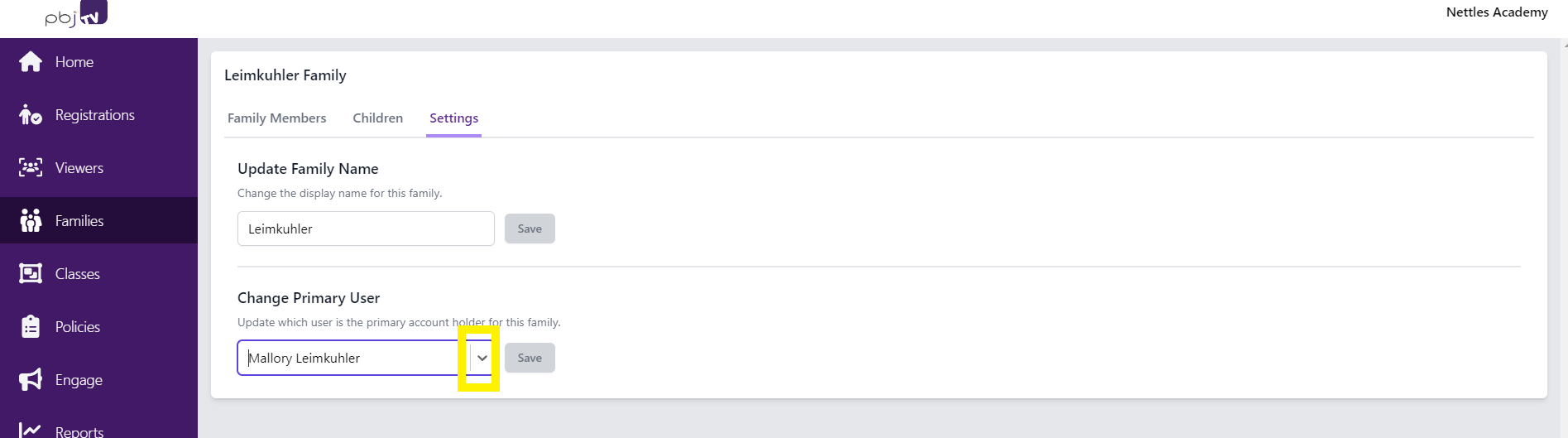
Comments
0 comments